

Connect your CloudCart store
On CloudCart, Releva has two parts. Your catalog is read by a connector that Releva hosts: when your shop is created in Releva with Platform set to Cloudcart, the catalog sync address is set to https://releva.ai/api/cloudcart/products and you change nothing there. Tracking and personalization come from a JavaScript snippet that you paste into your CloudCart theme’s Custom CSS/JS. The snippet reads CloudCart’s dataLayer, sends page views, product views, searches and the cart to Releva, and renders the product blocks Releva returns.
The steps inside the CloudCart admin and the snippet below come from the connector’s setup guide; your admin can look different.
Before you start
Section titled “Before you start”- Your shop exists in Releva with Platform set to Cloudcart. The platform is chosen when the shop is created and is read-only afterwards on Settings › Shop & Integration › General. If you have no shop yet, see Creating a shop or ask your account manager.
- Releva’s CloudCart connector knows your shop. Setting that up is done by Releva, not in the CloudCart admin; ask your account manager to confirm it before you run the first catalog sync.
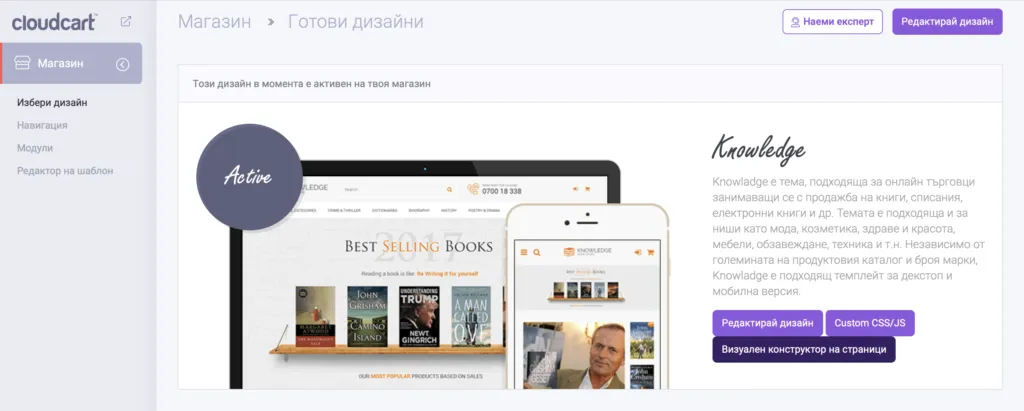
- You can edit your CloudCart theme (Магазин › Избери дизайн › Custom CSS/JS).
- You have one Releva page per page type you want to personalize: home, category, product, cart and search. See Pages and tokens. Releva creates no pages for a new shop; create them on Personalization › Product Blocks with New Page.
- Your storefront’s cookie banner is CloudCart’s own. The snippet reads the
cc-cookie-consentcookie and only tracks with full consent when it containstargeting.
Install
Section titled “Install”There is nothing to install from an app store. The integration is the snippet below.
-
In the CloudCart admin, open Магазин › Избери дизайн and select Custom CSS/JS on your active theme.
-
At the top of the page, add the SDK script tag:
<script type="text/javascript" src="https://releva.ai/sdk/v0/js/releva-sdk-js.min.js"></script> -
At the bottom of the page, add the tracking snippet from Configure with your tokens filled in, then save.
Configure
Section titled “Configure”1. Copy your keys from Releva
Section titled “1. Copy your keys from Releva”Open Settings › Shop & Integration. On the General tab, copy Access Token with the copy icon next to it. Guide: Find your Access Token and Secret Key. The snippet needs only the Access Token; never put the Secret Key in storefront code.
Then copy one page token per page type from Personalization › Product Blocks: pick the page in the page selector and copy the value after Token:. Guide: Copy your page tokens (the Releva side is the same for every platform).
2. Fill in the snippet
Section titled “2. Fill in the snippet”Replace the empty strings in the CONSTANTS block:
| Variable | Value |
|---|---|
accessToken |
Access Token from Settings › Shop & Integration › General |
homePageToken |
token of your home page |
categoryPageToken |
token of your category page |
productPageToken |
token of your product page |
cartPageToken |
token of your cart page |
searchPageToken |
token of your search results page |
shopLocale is read from the page’s lang attribute and cartCurrencyString is not used by the rest of the snippet; leave both as they are.
This is the snippet:
<!-- Releva Push --><script>    // CONSTANTS: please change for each customer    var accessToken = '';  // your Access Token    var homePageToken = ''; // your home page token    var categoryPageToken = '';  // your category page token    var productPageToken = ''; // your product page token    var cartPageToken = ''; // your cart page token    var searchPageToken = ''; // your search page token    var shopLocale = document.getElementsByTagName('html')[0].getAttribute('lang');    var cartCurrencyString = 'лв';    // END CONSTANTS    var relevaPushOpts = {      hasConsent: function() {        var relevaConsentCookieValue = Releva.getCookie('cc-cookie-consent');        var relevaHasConsent = relevaConsentCookieValue && relevaConsentCookieValue.indexOf('targeting') !== -1;        if (!relevaHasConsent) {          console.warn('Releva has not received targeting consent, running in cookiless mode.');        }        return relevaHasConsent;      }    };
    var categories = [];    var customerObj = {};    var productObj = {};    window.relevaPushObject = {      page: {        locale: shopLocale,        query: Releva.getUrlSearchParameterByName('query') || undefined,        currency: window.cc_settings?.currency || undefined      }    };
    var pageType = '';    var cartProducts = [];    console.log('Releva SDK loaded');
    //collect page data    for (const e of dataLayer.entries()) {      for (const obj of e) {        if (!obj.cc_page_data) {          continue        }
        var pageData = obj.cc_page_data        pageType = pageData.type
        if (pageData.products) {          window.relevaPushObject.page.ids = [];          for (var i = 0; i < pageData.products.length; i++) {            window.relevaPushObject.page.ids.push(pageData.products[i].id.toString());          }        }
        if (pageType == 'category') {          for (const category of pageData.breadcrumb) {            categories.push(category.name)          }          window.relevaPushObject.page.categories = [categories.join('/')];        }        if (pageType == 'product') {          window.relevaPushObject.product = {            id: pageData.id.toString()          }        }
        if (pageType == 'checkout' || pageType == 'cart') {          for (const product of pageData.products) {            var tempPrice = product.price;            if (product.discount_price > 0) {              tempPrice = product.discount_price;            }            cartProducts.push({              id: product.id.toString(),              price: parseFloat(tempPrice.replace(/,/g, '.')),              currency: product.currency,              quantity: parseFloat(product.quantity),            })          }          window.relevaPushObject.cart = {            products: cartProducts          }        }      }    }
    var updateCart = function() {      setTimeout(function() {        var cartEl = document.getElementsByClassName('_cart-compact')        var cartItems = cartEl[cartEl.length - 1].getElementsByTagName('li');        var products = [];        for (var i = 0; i < cartItems.length; i++) {          var itemPriceElement = cartItems[i].getElementsByClassName('_cart-compact-products-list-item-price')[0];          var itemPriceText = itemPriceElement.textContent;
          // Check if itemPriceText contains a valid price          var priceMatch = itemPriceText.match(/\d+(\.\d+)?/);
          if (priceMatch) {            var itemPrice = parseFloat(itemPriceText.split(' ')[0].replace(/,/g, '.'));
            var itemId = cartItems[i].getElementsByClassName('product-cart-product-image')[0].getAttribute('src').split('images/')[1].split('/')[0];            var quantityElement = cartItems[i].querySelector('a._cart-compact-products-list-item-link > span._cart-compact-products-list-item-info > span._cart-compact-products-list-item-parameters.visible > span:nth-child(1) > span');            var itemQuantityText = quantityElement.innerHTML;
            // Check if itemQuantityText contains a valid quantity            var quantityMatch = itemQuantityText.match(/\d+/);
            if (quantityMatch) {              var itemQuantity = parseFloat(quantityMatch[0]);
              products.push({                id: itemId.toString(),                price: itemPrice,                quantity: itemQuantity,              });            }          }        }        if (products.length > 0) {          window.relevaPushObject.cart = {            products: products          }        }        //push for add to cart        Releva.push(accessToken, window.relevaPushObject, function() {}, console.error, relevaPushOpts);      }, 2000);    };
    $(document).on('click', '.add-cart-product', function() {    // if ajaxModal is 'true', it means that a product dialog is open and we should track a product view instead      // we do that in a different location      if (!this.dataset.ajaxModal) {        updateCart();      }    });
    $(document).on('submit', '.add-to-cart-form-js', function() {    updateCart();    });
    //page push    var pagePush = function() {      if (pageType == 'category') {        window.relevaPushObject.page.token = categoryPageToken;      }      if (pageType == 'home') {        window.relevaPushObject.page.token = homePageToken;      }      if (pageType == 'search') {        window.relevaPushObject.page.token = searchPageToken;      }      if (pageType == 'product') {        window.relevaPushObject.page.token = productPageToken;      }      if (pageType == 'checkout' || pageType == 'cart') {        window.relevaPushObject.page.token = cartPageToken;        if (Object.keys(customerObj).length === 0) {          $('.cc-form-shipping-type').on("submit", function() {            var queryString = $('.cc-form-shipping-type').serializeArray();            $.each(queryString, function(index, fieldValuePair) {              if (fieldValuePair.name == 'email') {                customerObj['email'] = fieldValuePair.value;              }              if (fieldValuePair.name == 'checkout[shipping][address][first_name]') {                customerObj['firstName'] = fieldValuePair.value;              }              if (fieldValuePair.name == 'checkout[shipping][address][last_name]') {                customerObj['lastName'] = fieldValuePair.value;              }              if (fieldValuePair.name == 'checkout[shipping][address][phone]') {                customerObj['phoneNumber'] = fieldValuePair.value;              }            });            window.relevaPushObject.profile = customerObj;            //push for cart guest checkout            Releva.push(accessToken, window.relevaPushObject, function() {}, console.error, relevaPushOpts);          });        }      }
      if(document.getElementsByClassName('page-product').length > 0 && document.getElementsByClassName('modal-dialog product-details').length > 0){    delete window.relevaPushObject.page.token;      }
      Releva.push(accessToken, window.relevaPushObject, function() {}, console.error, relevaPushOpts);    }
    //collect customer data    var relevaOriginalPush = dataLayer.push    dataLayer.push = function(...args) {      relevaOriginalPush.apply(dataLayer, args);      for (const arg of args) {        if (arg.cc_customer_data) {          var customer = arg.cc_customer_data;          window.relevaPushObject.profile = {            firstName: customer.first_name,            lastName: customer.last_name,            email: customer.email          }        }        // we need this for popup product view push        if (arg.cc_page_data) {          pageType = 'product';          window.relevaPushObject.product = {            id: arg.cc_page_data.id.toString()          }          pagePush();          // clean up so we don't keep attributing to recommender forever          delete window.relevaPushObject.rid;          delete window.relevaPushObject.rpid;        }      }    }
    $(document).on('click','._cart-compact-button',function() {         window.relevaPushObject.page.token = cartPageToken;        Releva.push(accessToken, window.relevaPushObject, function() {}, console.error, relevaPushOpts);    })
    document.addEventListener('click', function(e) {      var target = e.target;      if (target.getAttribute('data-modal-class') !== 'product-details') {        target = e.target.closest('[data-modal-class="product-details"]');      }      if (target && target.href && window.relevaPushObject) {        var searchParams = new URL(target.href).searchParams;        window.relevaPushObject.rid = searchParams.get('rlv_rid');        window.relevaPushObject.rpid = searchParams.get('rlv_rpid');      }    });
    window.addEventListener('load', function () {      pagePush();    });</script><!-- /Releva Push -->
Verify
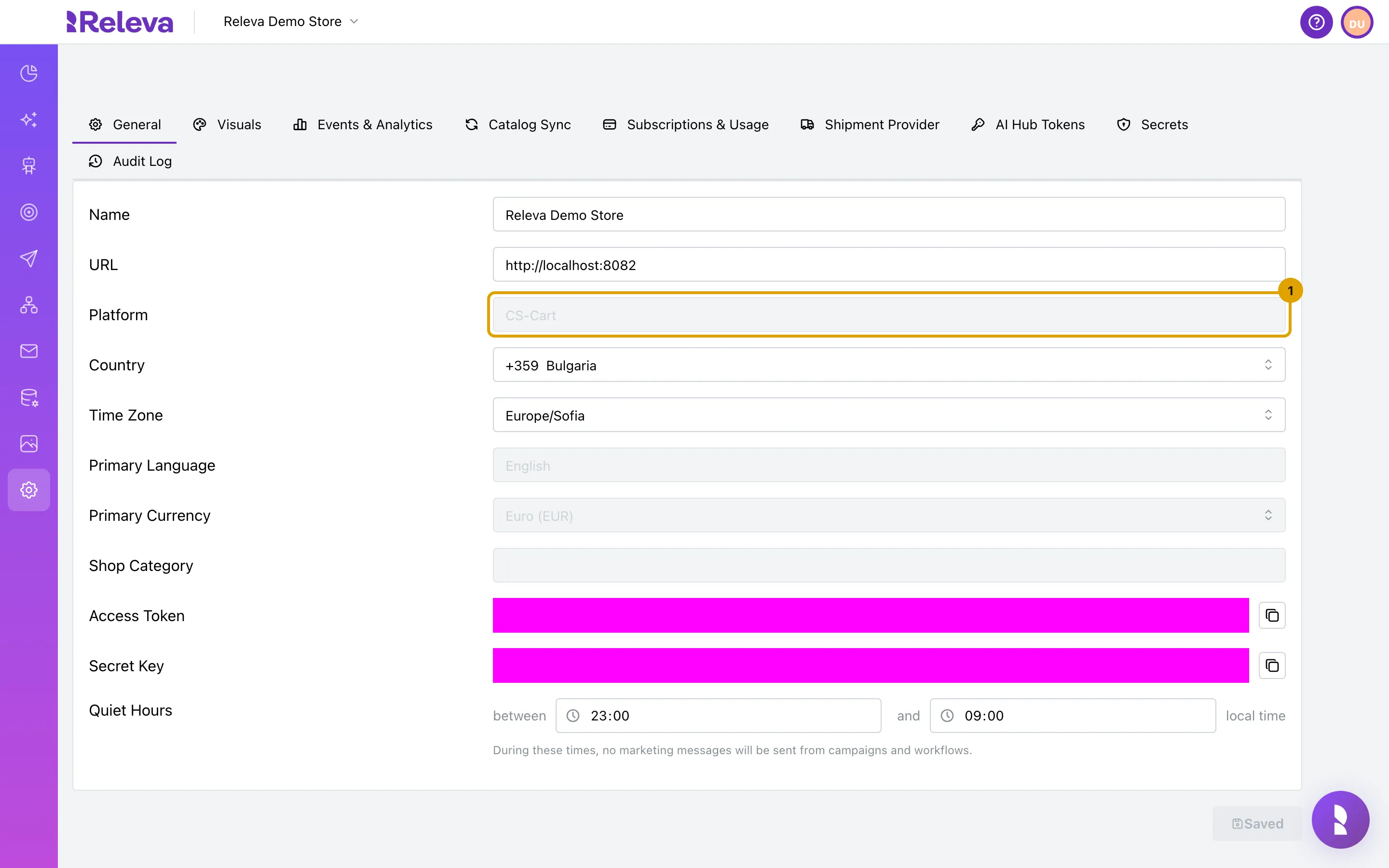
Section titled “Verify”The Releva side is the same for every platform; the screenshots show a CS-Cart shop, so Platform reads CS-Cart instead of Cloudcart.
-
Open Settings › Shop & Integration. On the General tab, Platform shows the platform your shop was created with, for example CS-Cart.
-
Select the Catalog Sync tab. With API selected, the address field shows the address Releva reads your catalog from. It was filled in when your shop was created in Releva and depends on the platform.
For a CloudCart shop it is
https://releva.ai/api/cloudcart/products. The screenshot shows the CS-Cart address on a demo host.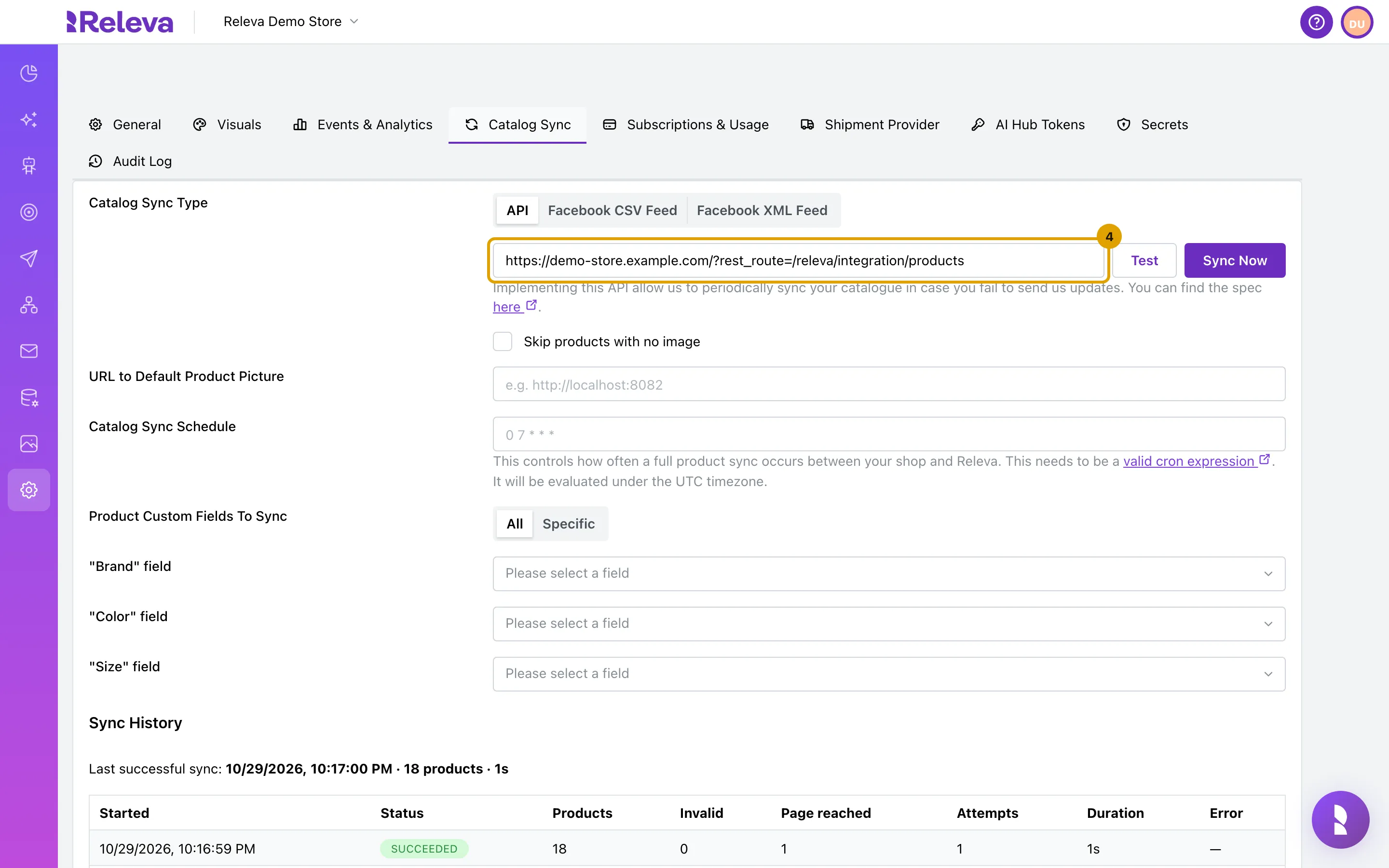
-
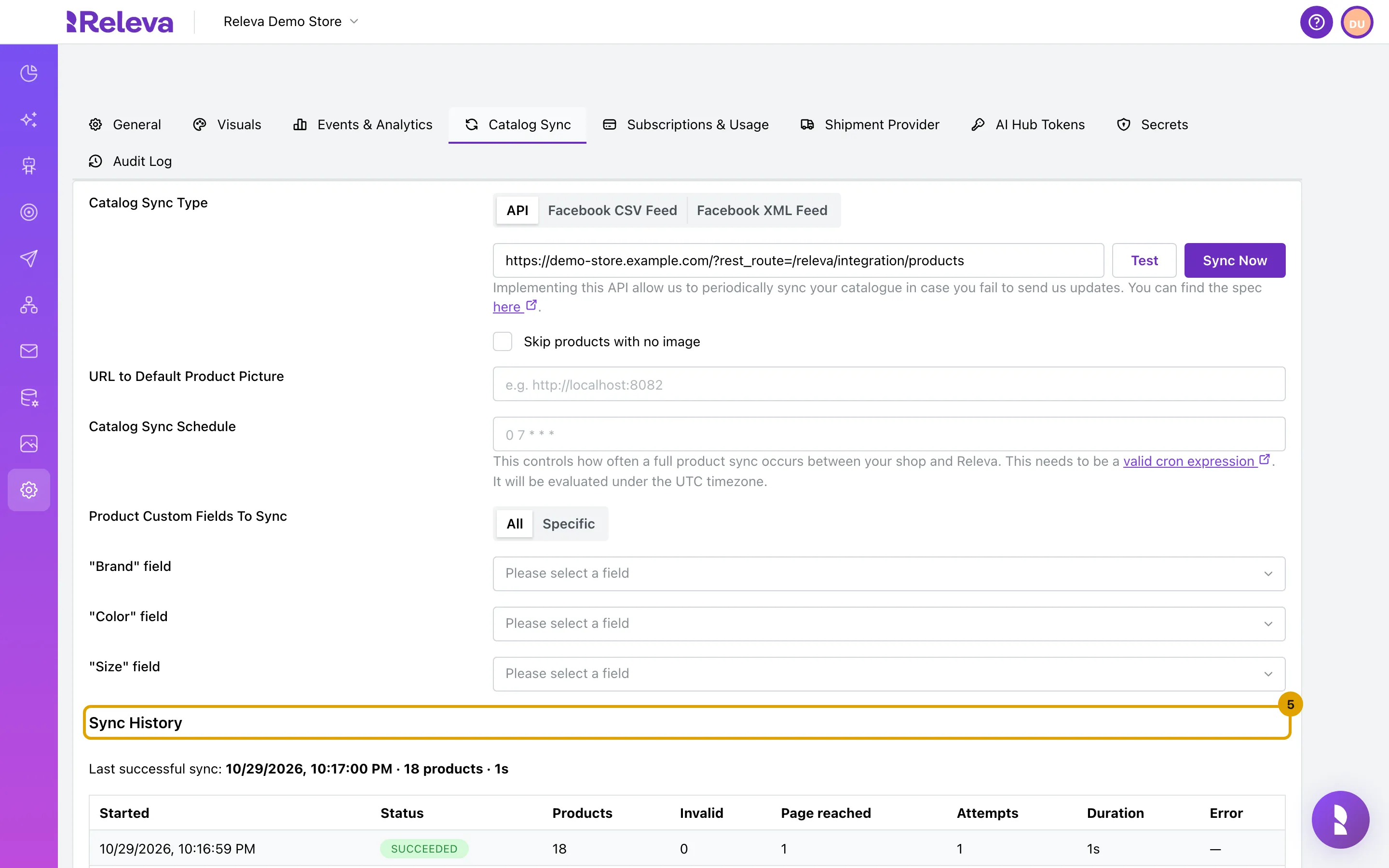
Sync History lists each catalog sync with its status and product count. Last successful sync: shows the time, product count and duration of the last sync that worked; Never means Releva has not read your catalog yet.
Select Sync Now to run the first sync, and set a Catalog Sync Schedule: Schedule a full catalog sync.
-
For CloudCart and GombaShop, open Personalization › Product Blocks. Pick a page in the page selector; Token: is the page token that goes into the storefront code for that page.
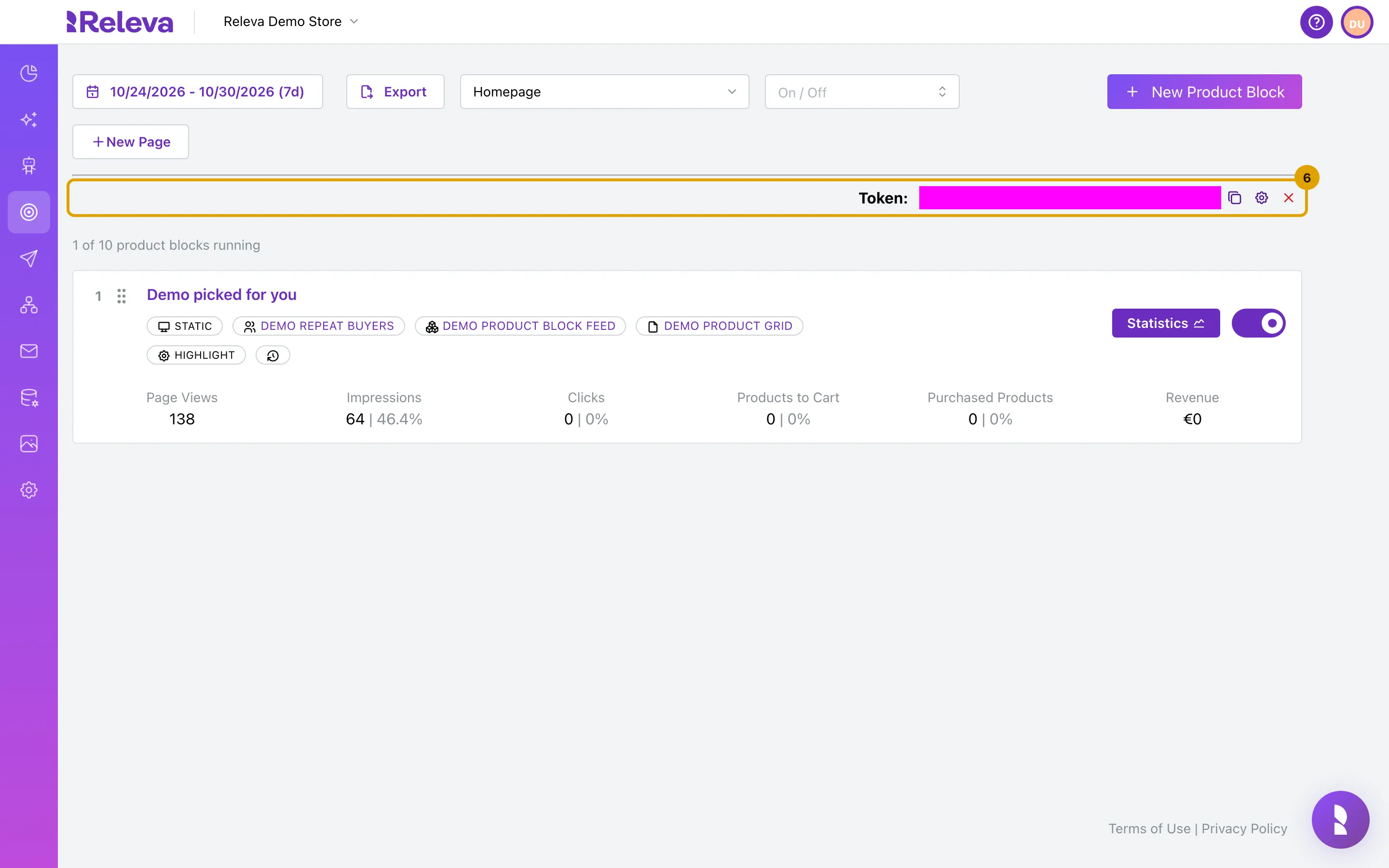
Then open your storefront in a browser, visit a few pages, view a product and add it to the cart, and check Data Platform › Events, Data Platform › Products and Data Platform › Profiles in Releva. The screens are the same for every platform: Check that your store data arrives.
In the screenshots the key fields and the token are masked.
Troubleshooting
Section titled “Troubleshooting”No Viewed Page events arrive. Open the storefront with the browser console visible. Releva SDK loaded is printed by the snippet once it runs; if it is missing, the snippet is not on the page or the SDK script tag at the top of Custom CSS/JS is missing. The snippet also needs jQuery ($), which CloudCart themes load.
Events arrive without a Page. The page token for that page type is empty or belongs to another shop. Check the five token variables against Personalization › Product Blocks.
The console says Releva has not received targeting consent, running in cookiless mode. This is expected until the visitor accepts targeting cookies in CloudCart’s banner. Events are still sent, with consent: mandatoryCookies, so they are not tied to a persistent cookie. See How consent works in Releva.
Sync History shows a failed run. The connector did not answer for your shop. Ask your account manager to check that the connector is set up for your store; the address itself needs no change.
Add-to-cart is not tracked after a theme change. The snippet reads the mini cart from the theme’s DOM (._cart-compact and its item classes) two seconds after an add-to-cart click. A theme that renames those classes breaks cart tracking; page and product tracking keep working.
What syncs
Section titled “What syncs”The snippet sends what happens in the browser. Releva’s hosted CloudCart connector also registers CloudCart webhooks for your shop and sends orders, customers and product changes to Releva from the server, with your shop’s Secret Key.
| Data | Direction | Endpoint | When |
|---|---|---|---|
| Products (full catalog) | Releva pulls from Releva’s CloudCart connector | GET https://releva.ai/api/cloudcart/products with page and x-rlv-authorization: Bearer <secretKey> |
On Sync Now and on the Catalog Sync Schedule. Set when the shop is created; no schedule is preset. Contract: the pull-sync endpoint. |
| Page views, category, product views, search query | Storefront (snippet, SDK) | POST /api/v0/push/{accessToken} |
On window.load, from CloudCart’s cc_page_data (type, products[].id, breadcrumb, id); again when a product quick-view opens. The response carries the product blocks for the page. |
| Cart | Storefront (snippet) | POST /api/v0/push/{accessToken}, cart.products |
On cart and checkout pages from cc_page_data; after add-to-cart from the mini cart DOM. |
| Profile | Storefront (snippet) | POST /api/v0/push/{accessToken}, profile |
Logged-in: cc_customer_data (first name, last name, e-mail). Guest: e-mail, names and phone from the shipping form on submit. |
| Recommendation clicks | Storefront (snippet) | rid / rpid in the push |
From rlv_rid and rlv_rpid link parameters when a product quick-view opens. |
| Cookie consent | Storefront (SDK) | profile.consent in every push |
cookiesPolicy when the cc-cookie-consent cookie contains targeting, mandatoryCookies otherwise. |
| Product changes between syncs | Releva’s hosted connector | POST /api/v0/products, DELETE /api/v0/products/{id} |
On CloudCart’s product.created, product.updated and product.deleted webhooks. |
| Orders | Releva’s hosted connector | POST /api/v0/carts with cartPaid: true and orderId |
On CloudCart’s order.created webhook, with the customer’s e-mail and the order lines. The snippet sends no cartPaid or orderId. |
| Customers | Releva’s hosted connector | POST /api/v0/register; POST /api/v0/profiles with subscribedAtChanged: false |
On CloudCart’s customer.created webhook (registration) and customer.updated webhook (first name, last name, e-mail, registration date). Marketing consent is not changed. |
| Subscribers, unsubscribes | not sent | No subscriber sync address is preset for CloudCart. | |
| Order status changes | not sent | CloudCart shops do not send orderStatusChanged events. |
See How Releva connects to your shop for how the pull sync and the snippet fit together.