

Connect your GombaShop or Shopiko store
On GombaShop and Shopiko, Releva has two parts. Your catalog is read by a connector that Releva hosts: it logs in to your shop’s CMS with a user you create for it, and when your shop is created in Releva with Platform set to GombaShop or Shopiko the catalog sync address is set to https://releva.ai/api/gombashop/products. Tracking and personalization come from a JavaScript snippet that you paste into the CMS under Разработчик › Инжектиране на код. The snippet detects the page type from the URL, sends page views, product views, searches, the cart, the customer and paid orders to Releva, and renders the product blocks Releva returns.
GombaShop and Shopiko share the same CMS and the same connector; this page uses GombaShop’s menu labels. The steps inside the GombaShop CMS and the snippet below come from the connector’s setup guide; your CMS can look different.
Before you start
Section titled “Before you start”- Your shop exists in Releva with Platform set to GombaShop or Shopiko. The platform is chosen when the shop is created and is read-only afterwards on Settings › Shop & Integration › General. If you have no shop yet, see Creating a shop or ask your account manager.
- Developer settings and API access are enabled on your GombaShop account. Request them from GombaShop support.
- Your account manager has given you the e-mail address and password for the CMS user that Releva’s connector will use.
- You have one Releva page per page type you want to personalize: home, category, product, cart and search. See Pages and tokens. Releva creates no pages for a new shop; create them on Personalization › Product Blocks with New Page.
Install
Section titled “Install”A. Paste the snippet
Section titled “A. Paste the snippet”-
Open your CMS at
https://<your shop>/cms/and select the Разработчик tab.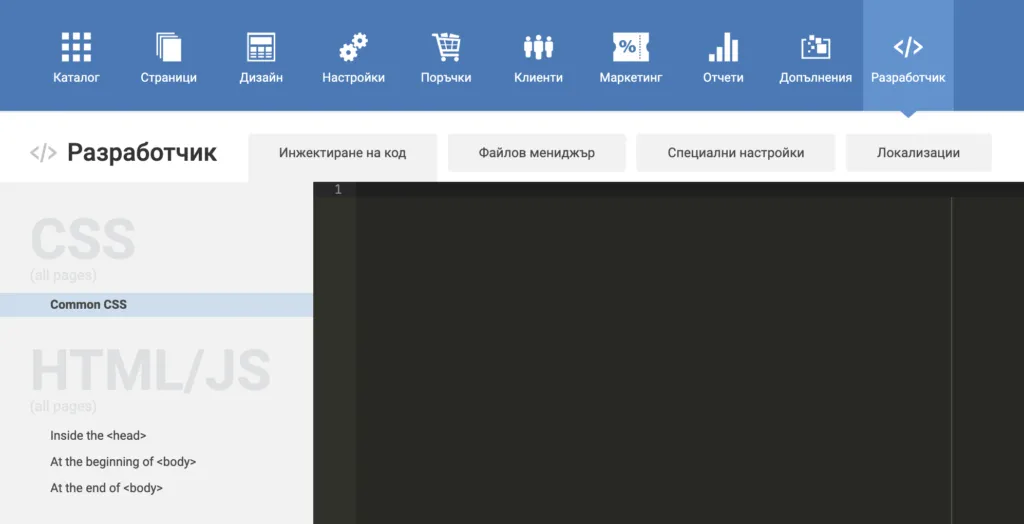
-
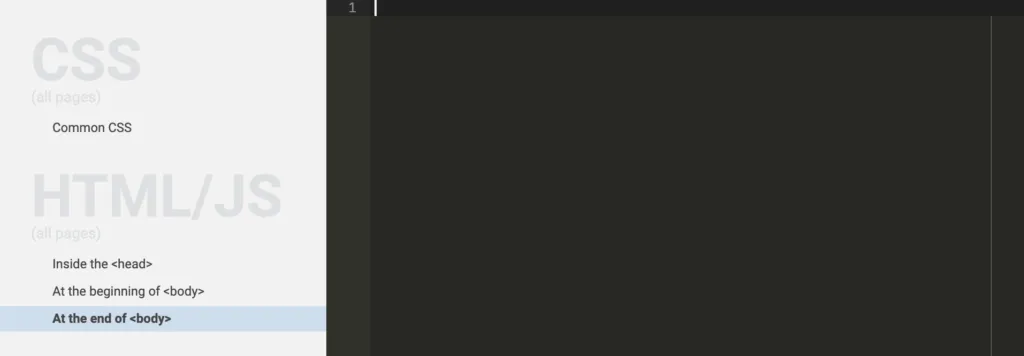
Under HTML/JS, select At the end of <body>.
-
Paste the snippet from Configure with your tokens filled in, then select Запис (save) at the top right.
B. Create a CMS user for the catalog connector
Section titled “B. Create a CMS user for the catalog connector”Releva’s connector reads your catalog by logging in to the CMS. It needs its own user.
-
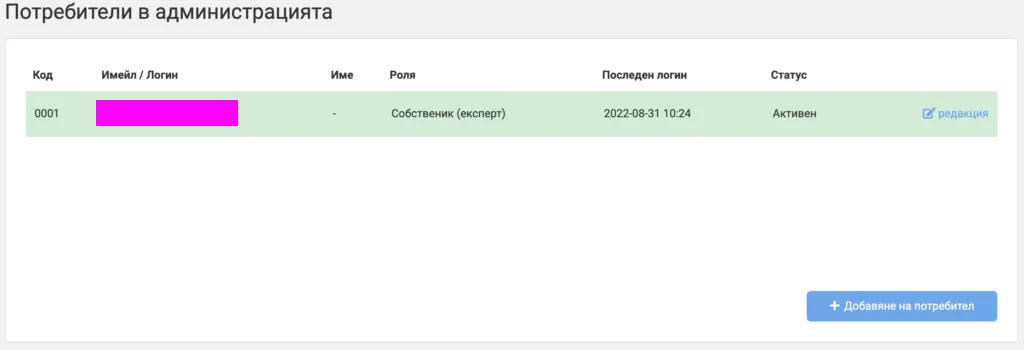
Hover Абонамент and select Потребители.

-
Select Добавяне на потребител.
-
Enter the e-mail address and password your account manager gave you, tick the role Собственик (експерт) and select Save.
Web push is optional. It needs one more step: under Файлов мениджър › Добави файл, upload a copy of https://releva.ai/sdk/v0/js/service-worker.min.js saved as service-worker.js.
Configure
Section titled “Configure”1. Copy your keys from Releva
Section titled “1. Copy your keys from Releva”Open Settings › Shop & Integration. On the General tab, copy Access Token with the copy icon next to it. Guide: Find your Access Token and Secret Key. The snippet needs only the Access Token; never put the Secret Key in storefront code.
Then copy one page token per page type from Personalization › Product Blocks: pick the page in the page selector and copy the value after Token:. Guide: Copy your page tokens (the Releva side is the same for every platform).
2. Fill in the snippet
Section titled “2. Fill in the snippet”| Variable | Value |
|---|---|
accessToken |
Access Token from Settings › Shop & Integration › General |
pageTokens.home |
token of your home page |
pageTokens.category |
token of your category page |
pageTokens.product |
token of your product page |
pageTokens.cart |
token of your cart page |
pageTokens.search |
token of your search results page |
This is the snippet:
<script  async  type="text/javascript"  src="https://releva.ai/sdk/v0/js/releva-sdk-js.min.js"  onload="document.dispatchEvent(new Event('relevaSdkLoaded'));"></script>
<script>  document.addEventListener('relevaSdkLoaded', function () {    // Fill in: the Access Token from Releva, Settings › Shop & Integration › General    var accessToken = '';    // Fill in: the page tokens from Releva, Personalization › Product Blocks    var pageTokens = {      home: '',      category: '',      product: '',      cart: '',      search: '',    };
    var relevaPushObject = {      page: {},      cart: { products: [] },      profile: {},    };
    var path = window.location.pathname;
    // Thank you page for ordering    if (/purchase-done.html/.test(path)) {      // Get the releva push object where the order details are stored      // from local storage because we can't get these details on this page      relevaPushObject = getRelevaPushObject();
      // There is no releva push object in the local storage      if (!relevaPushObject) {        return;      }
      relevaPushObject.cart.cartPaid = true;      // Add the order id from this page      relevaPushObject.cart.orderId = $('.number-holder').text();
      relevaPush(relevaPushObject);      removeRelevaPushObject();      return;    }
    var promisesToWait = [getCartProducts(), getUserProfile()];
    Promise.all(promisesToWait).then((data) => {      relevaPushObject.cart.products = data[0];      relevaPushObject.profile = data[1];
      var isUserLoggedIn = Object.keys(relevaPushObject.profile).length;
      // User is not logged in so try to get anonymous profile      if (!isUserLoggedIn) {        anonymousProfile = localStorage.getItem('anonymousProfile');
        if (anonymousProfile) {          relevaPushObject.profile = JSON.parse(anonymousProfile);        }      }
      // Home page      if (path === '/') {        relevaPushObject.page.token = pageTokens.home;      }
      // Category page      if (isCategoryPage(path)) {        relevaPushObject.page.token = pageTokens.category;        relevaPushObject.page.ids = getListedProducts();        relevaPushObject.page.categories = getPageCategories();      }
      // Product page      if (isProductPage(path)) {        relevaPushObject.page.token = pageTokens.product;        relevaPushObject.product = { id: getProductId() };        relevaPushObject.product.custom = getProductCustomOptions();
        // Changed the selected variant of the product which means        // that we are viewing the product with custom options        window.addEventListener('hashchange', () => {          relevaPushObject.product.custom = getProductCustomOptions();          relevaPush(relevaPushObject);        });      }
      // Cart page      if (path === '/shopping-cart.html') {        relevaPushObject.page.token = pageTokens.cart;      }
      // Search page      if (path === '/search.php') {        relevaPushObject.page.token = pageTokens.search;        relevaPushObject.page.query = getSearchQuery();        relevaPushObject.page.ids = getListedProducts();      }
      // Confirm order page      if (path === '/confirm.html') {        // Check if user is making order without registered profile        if (!isUserLoggedIn) {          var clientInformation = getAnonymousClientInformation();
          relevaPushObject.profile = clientInformation;
          // Save anonymous profile of the user          localStorage.setItem('anonymousProfile', JSON.stringify(clientInformation));        }
        var confirmForm = $('#mainFrm');        confirmForm.on('submit', () => confirmOrder(relevaPushObject));      }
      relevaPush(relevaPushObject);    });
    function getCartProducts() {      return ajax({ url: '/axCartList.php', type: 'GET' })        .then((response) => {          var $response = $(response);
          var products = [];          var $products = $response.find('.gs-cart-row:not(.head-row)');          if (!$products.length) {            $products = $response.find('.mgs-cart-row:not(.head-row)');          }
          $products.each(function () {            var $product = $(this);
            var $quantityInput = $product.find('.item-sum');            var quantityInputName = $quantityInput.attr('name');            var quantity = parseInt($quantityInput.val());
            var id = quantityInputName.substring(              quantityInputName.lastIndexOf('[') + 1,              quantityInputName.lastIndexOf(']')            );
            // Remove the variation ids from the actual product id            if (id.indexOf('-') !== -1) {              id = id.substring(0, id.indexOf('-'));            }
            var $price = $product.find('.gs-order-price span');            if (!$price.length) {              $price = $product.find('.mgs-order-price span');            }
            var price = parseFloat($price.text().split(' ')[0].replace(',', '.'));
            var custom = undefined;
            var $selectedOptions = $product.find('.gs-order-info .gs-info-row');            if (!$selectedOptions.length) {              $selectedOptions = $product.find('.mgs-order-info .mgs-info-row');            }
            if ($selectedOptions.length) {              custom = { string: [] };
              $selectedOptions.each(function () {                var $row = $(this);                custom.string.push({ key: $row.find('span').text(), values: [$row.find('strong').text()] });              });            }
            products.push({              id,              price,              quantity,              custom,            });          });
          return products;        })        .catch((error) => {          console.log(error);          return [];        });    }
    function getUserProfile() {      var userProfile = {};
      return ajax({ url: '/welcome.html', type: 'GET' })        .then((response) => {          var $response = $(response);
          var $firstNameInput = $response.find('input[name="client[name]"]');          if ($firstNameInput.length) {            userProfile.firstName = $firstNameInput.val();          }
          var $lastNameInput = $response.find('input[name="client[nameLast]"]');          if ($lastNameInput.length) {            userProfile.lastName = $lastNameInput.val();          }
          var $emailInput = $response.find('input[name="client[email]"]');          if ($emailInput.length) {            userProfile.email = $emailInput.val();          }
          return userProfile;        })        .catch((error) => {          console.log(error);          return userProfile;        });    }
    function getPageCategories() {      var categories = [];      var pageData = JSON.parse($('script[type="application/ld+json"]').html());      var categoriesData = pageData.itemListElement;
      // Remove the first element because it is the Home page      categoriesData.shift();
      categories = categoriesData.map((categoryData) => categoryData.item.name.trim());
      return [categories.join('/')];    }
    function getProductId() {      let productId = $('#orderFrm input[name="Id"]').val();
      // Fallback for products that are not available and the above selector won't work      if (!productId) {        productId = $('#stamped-main-widget').data('product-id');
        if (typeof productId === 'number') {          productId = productId.toString();        }      }
      // Another fallback if the above fallback does not work      if (!productId) {        $('script[type="application/ld+json"]').each((index, script) => {          if (!script || !script.text) {            return;          }
          const sku = JSON.parse(script.text.replaceAll('\n', '')).sku;          if (sku) {            productId = sku;          }        });      }
      return productId;    }
    function getListedProducts() {      var $products = $('#__gs-catalog-products-grid .gs-grid-inline-container > .gs-grid-item');
      if (!$products.length) {        $products = $('#__mgs-catalog-products-grid .mgs-grid-inline-container > .mgs-grid-item');      }
      if (!$products.length) {        return [];      }
      var productIds = [];
      $products.each((index, product) => {        var productId = $(product).data('pid').toString();        productIds.push(productId);      });
      return productIds;    }
    function getSearchQuery() {      var searchQuery = window.location.search;      // Remove '?search=' from start of the string      searchQuery = searchQuery.substring(8);      // Decode encoded uri      // Example -> '%D1%82%D0%B5%D1%81%D1%82' to 'тест'      searchQuery = decodeURI(searchQuery);      // Convert all '+' symbols to spaces      searchQuery = searchQuery.replaceAll('+', ' ');
      return searchQuery;    }
    function getAnonymousClientInformation() {      var client = {};
      var $checkoutInfo = $('.checkout-info').first();
      client.email = $checkoutInfo.find('p:nth-child(3)').text();
      var names = $checkoutInfo.find('p:nth-child(2)').text().split(' ');      client.firstName = names[0];      client.lastName = names[1];
      return client;    }
    function confirmOrder(relevaPushObject) {      saveRelevaPushObject(relevaPushObject);
      var isSubscribed = $('#newsletter').is(':checked');
      var profile = relevaPushObject.profile;
      if (isSubscribed && profile.email.length) {        Releva.requestSubscribe(profile.email, profile.firstName, profile.lastName, null, null, [], console.log);      }    }
    function saveRelevaPushObject(relevaPushObject) {      localStorage.setItem('relevaPushObject', JSON.stringify(relevaPushObject));    }
    function getRelevaPushObject() {      var relevaPushObject = localStorage.getItem('relevaPushObject');
      if (!relevaPushObject) {        return null;      }
      return JSON.parse(relevaPushObject);    }
    function removeRelevaPushObject() {      localStorage.removeItem('relevaPushObject');    }
    function relevaPush(relevaPushObject) {      Releva.push(        accessToken,        relevaPushObject,        function (result) {},        function (error) {}      );    }
    function isCategoryPage(path) {      // Check by url of the page      if (/catalog-details/.test(path)) {        return true;      }
      // This event is used only on category page      const gtagEvent = 'view_item_list';
      // Check by gtag (this is used when client have changed the url of the category page)      if (document.documentElement.textContent.includes(`gtag('event', '${gtagEvent}', {`)) {        return true;      }
      return false;    }
    function isProductPage(path) {      // Check by url of the page      if (/product-details/.test(path)) {        return true;      }
      // This event is used only on product page      const gtagEvent = 'view_item';
      // Check by gtag (this is used when client have changed the url of the product page)      if (document.documentElement.textContent.includes(`gtag('event', '${gtagEvent}', {`)) {        return true;      }
      return false;    }
    function ajax(options) {      return new Promise(function (resolve, reject) {        $.ajax(options).done(resolve).fail(reject);      });    }
    function getProductCustomOptions() {      var urlHash = window.location.hash;      // Check if we have selected variant, we do that because      // this means that every select element has selected value      if (!urlHash.startsWith('#variant=')) {        return;      }
      const customOptions = { string: [] };
      var $optionsSelects = $('#orderFrm .gs-select-wrap select');      if (!$optionsSelects.length) {        $optionsSelects = $('#orderFrm .mgs-select-wrap select');      }
      $optionsSelects.each(function () {        var $option = $(this);        var $selectedOption = $option.find('option:selected');
        if (!$selectedOption.length) {          return;        }
        var optionKey = $option.data('field-label');        var optionValue = $selectedOption.text();
        customOptions.string.push({          key: optionKey,          values: [optionValue],        });      });
      return customOptions;    }  });</script>
Verify
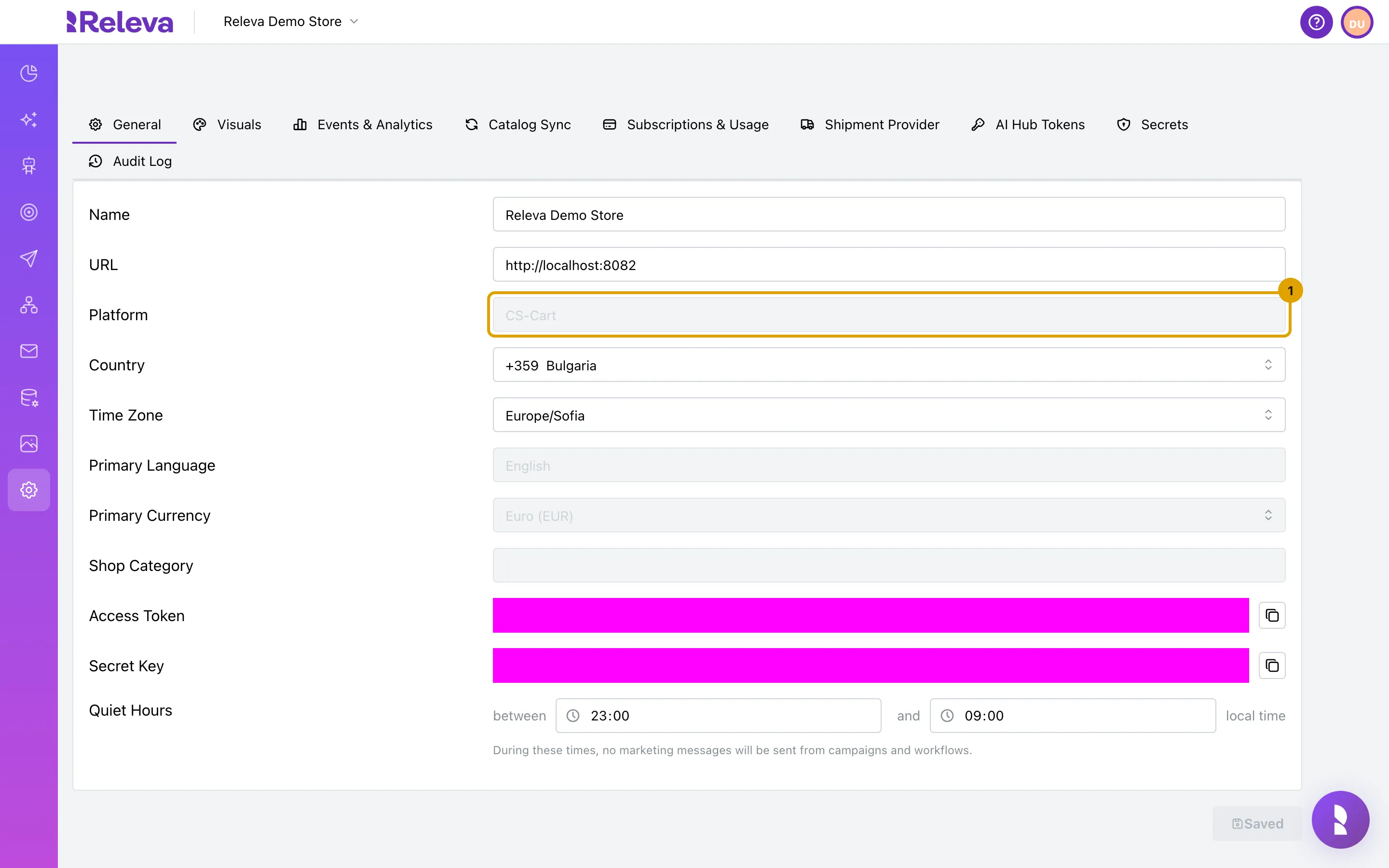
Section titled “Verify”The Releva side is the same for every platform; the screenshots show a CS-Cart shop, so Platform reads CS-Cart instead of GombaShop.
-
Open Settings › Shop & Integration. On the General tab, Platform shows the platform your shop was created with, for example CS-Cart.
-
Select the Catalog Sync tab. With API selected, the address field shows the address Releva reads your catalog from. It was filled in when your shop was created in Releva and depends on the platform.
For a GombaShop or Shopiko shop it is
https://releva.ai/api/gombashop/products. The screenshot shows the CS-Cart address on a demo host.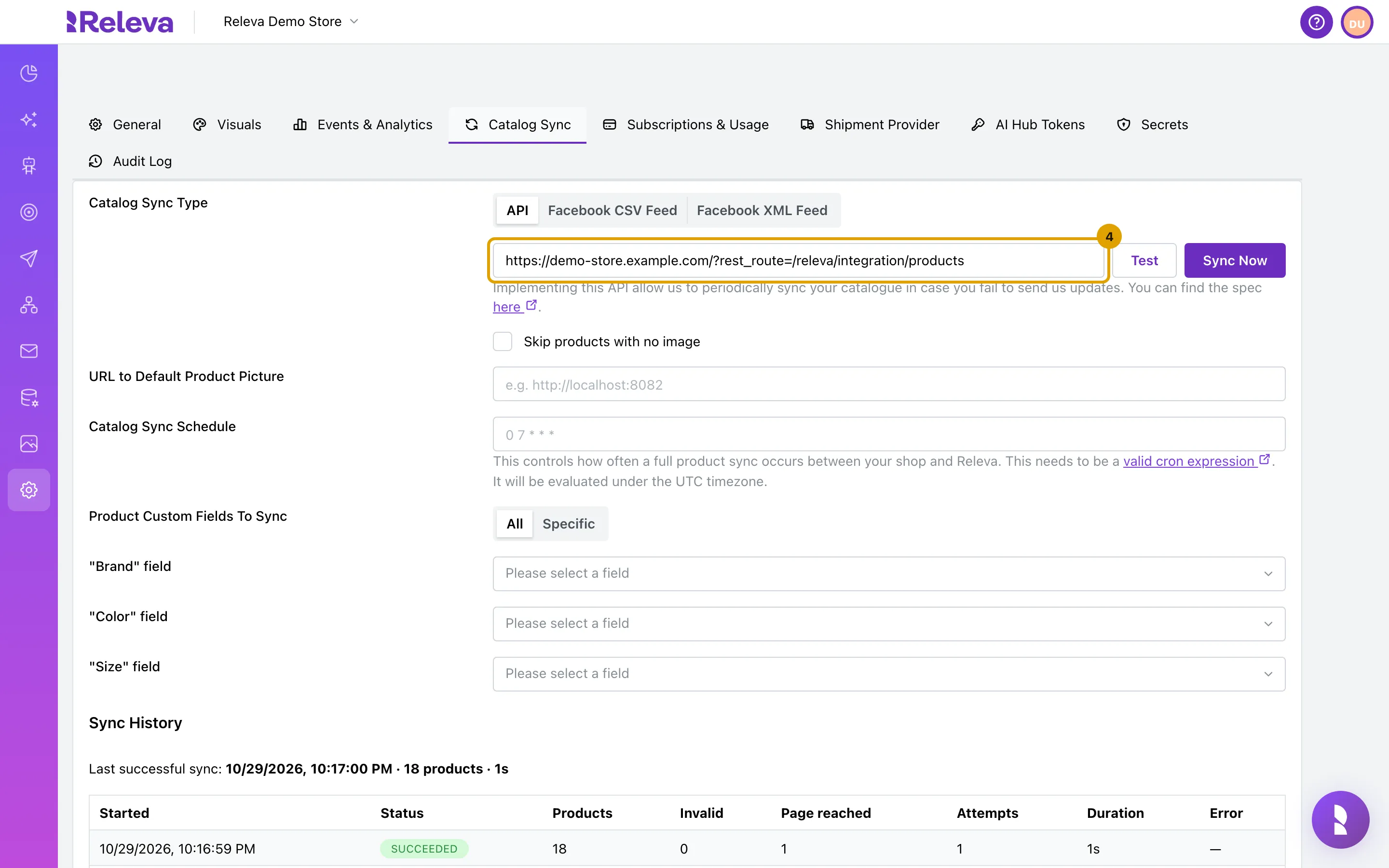
-
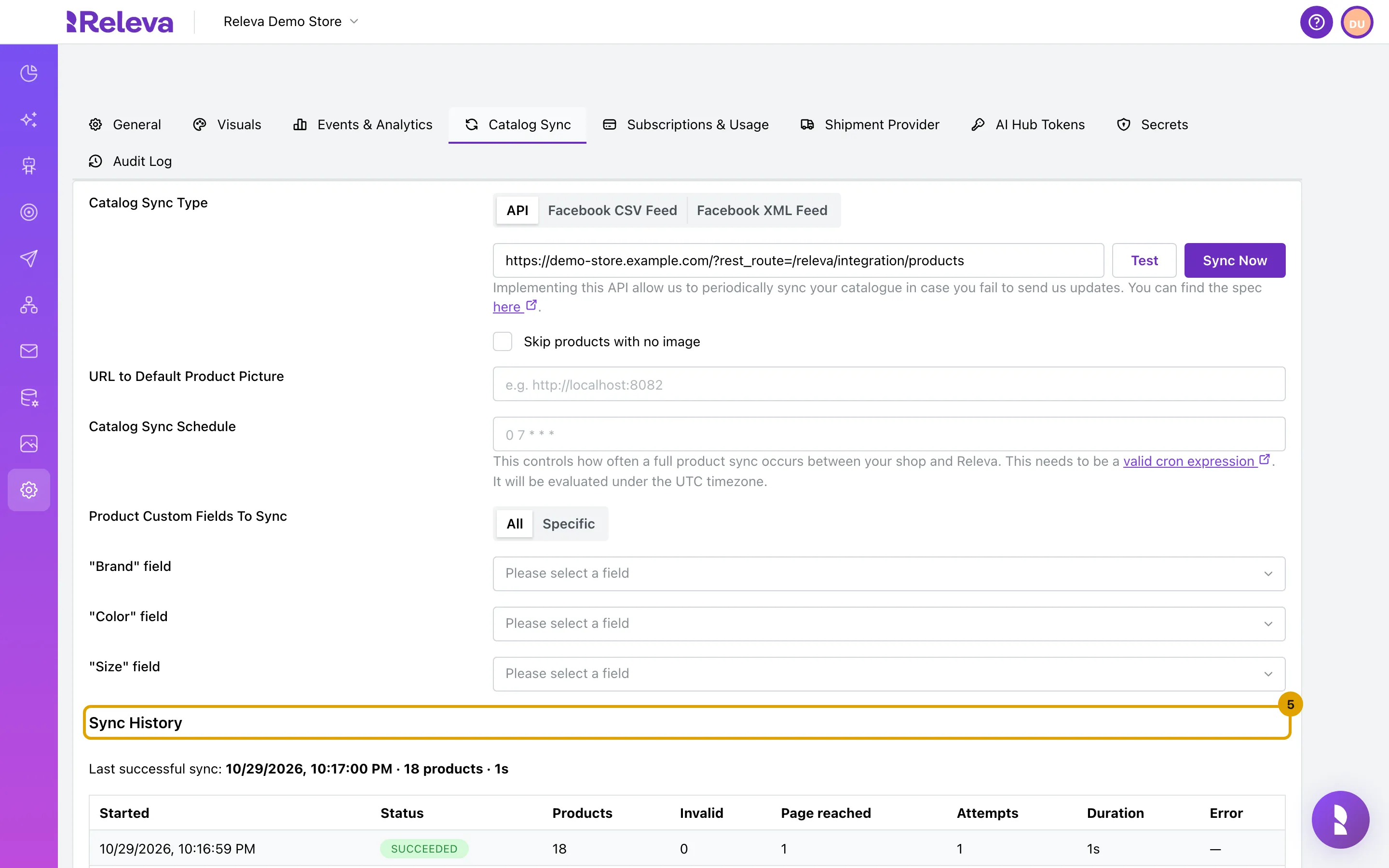
Sync History lists each catalog sync with its status and product count. Last successful sync: shows the time, product count and duration of the last sync that worked; Never means Releva has not read your catalog yet.
Select Sync Now to run the first sync, and set a Catalog Sync Schedule: Schedule a full catalog sync.
-
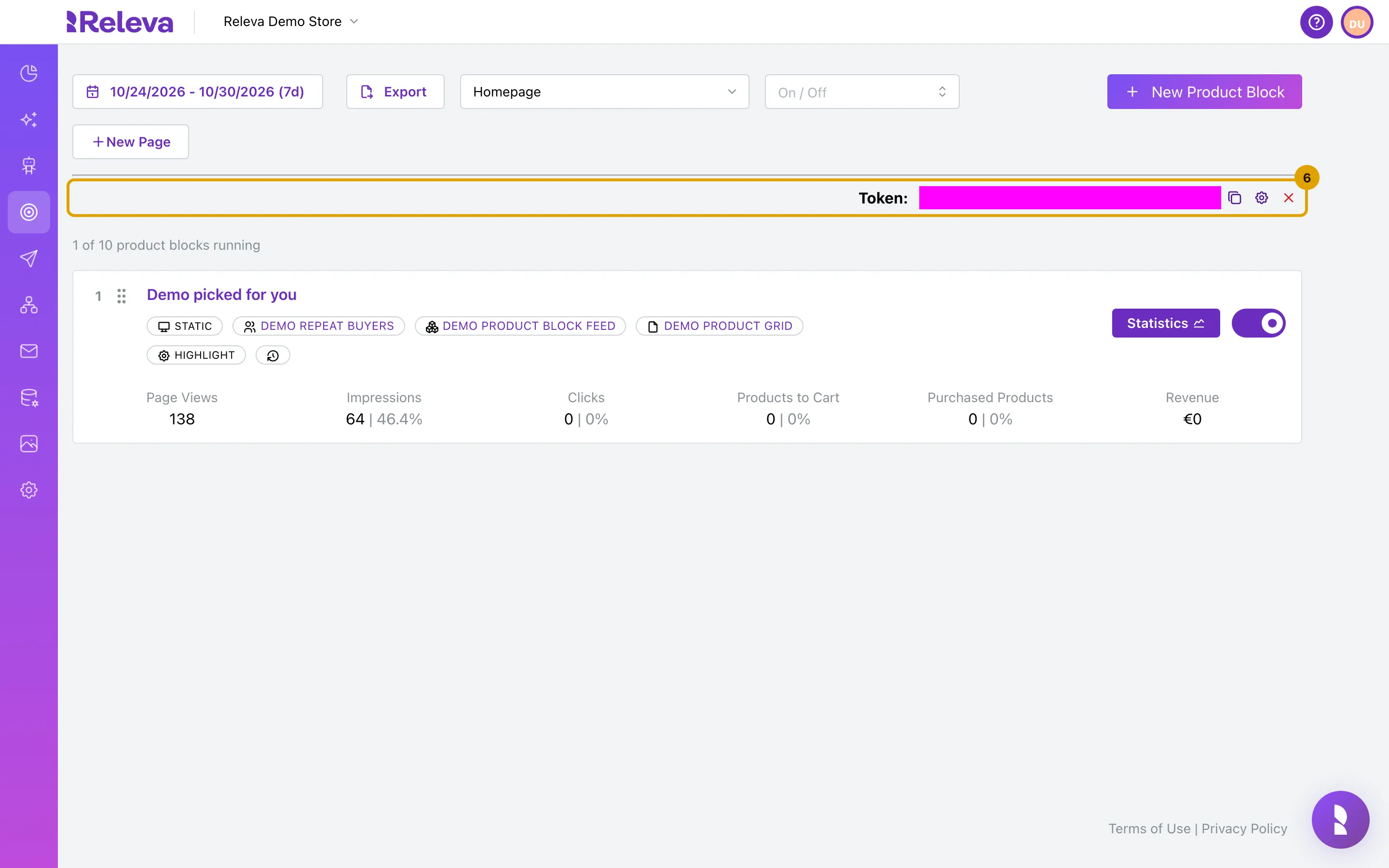
For CloudCart and GombaShop, open Personalization › Product Blocks. Pick a page in the page selector; Token: is the page token that goes into the storefront code for that page.
Then open your storefront in a browser, visit a few pages, view a product and add it to the cart, and check Data Platform › Events, Data Platform › Products and Data Platform › Profiles in Releva. The screens are the same for every platform: Check that your store data arrives.
In the screenshots the key fields and the token are masked.
Troubleshooting
Section titled “Troubleshooting”Sync History shows a failed run. The connector could not log in to your CMS. Check that the user from Install, part B exists, is active and has the Собственик (експерт) role, and that its password is the one you were given. The address on the Catalog Sync tab needs no change.
Page views arrive without a Page. The page type was not detected or its token is empty. The snippet recognises the home page (/), catalog-details and product-details URLs (or the view_item_list / view_item gtag calls when you renamed those URLs), /shopping-cart.html and /search.php. Other pages are tracked without a token.
Orders are missing. The snippet stores the cart when the shopper submits /confirm.html and sends it as paid on /purchase-done.html. An order placed without passing through both pages in the same browser is not tracked. Payment flows that return the shopper to a different thank-you page are not covered.
Events are all cookieless. The snippet passes no consent function, so every push is sent with consent: mandatoryCookies. Ask your account manager before adding a consent check; see How consent works in Releva.
Shopiko. The CMS is the same product, and Releva treats both platforms alike (same connector address). If a menu label differs in your Shopiko CMS, look for the equivalent developer and users screens.
What syncs
Section titled “What syncs”The rows describe the snippet above. What a connector sends can change between versions. If you depend on one of these, ask your account manager.
| Data | Direction | Endpoint | When |
|---|---|---|---|
| Products (full catalog) | Releva pulls from Releva’s GombaShop connector, which logs in to your CMS | GET https://releva.ai/api/gombashop/products with page and x-rlv-authorization: Bearer <secretKey> |
On Sync Now and on the Catalog Sync Schedule. Address set when the shop is created; no schedule is preset. Contract: the pull-sync endpoint. |
Page views, category, product views (with selected variant options as product.custom.string), search query |
Storefront (snippet, SDK) | POST /api/v0/push/{accessToken} |
On page load; again on hashchange when the shopper picks another variant. The response carries the product blocks for the page. |
| Cart | Storefront (snippet) | POST /api/v0/push/{accessToken}, cart.products |
On every page load, read from /axCartList.php. |
| Profile | Storefront (snippet) | POST /api/v0/push/{accessToken}, profile |
Logged-in: name and e-mail read from /welcome.html. Guest: name and e-mail from the /confirm.html summary, kept in localStorage. |
| Orders (paid carts) | Storefront (snippet) | POST /api/v0/push/{accessToken} with cart.cartPaid: true and cart.orderId |
On /purchase-done.html, with the order number from the page. |
| Newsletter opt-in | Storefront (SDK) | POST /api/v0/subscribe/request |
When the shopper ticks the newsletter box on /confirm.html: Releva.requestSubscribe(email, firstName, lastName, ...). Double opt-in or direct subscription follows the shop’s setting. |
| Cookie consent | Storefront (SDK) | profile.consent in every push |
Always mandatoryCookies: the snippet passes no hasConsent. |
| Subscriber list, unsubscribes | not set up | No subscriber sync address or unsubscribe link is preset for GombaShop. | |
| Order status changes | not sent | GombaShop and Shopiko shops do not send orderStatusChanged events. |
See How Releva connects to your shop.